April 18, 2014

Free Font Friday - {Janda Elegant Handwriting}

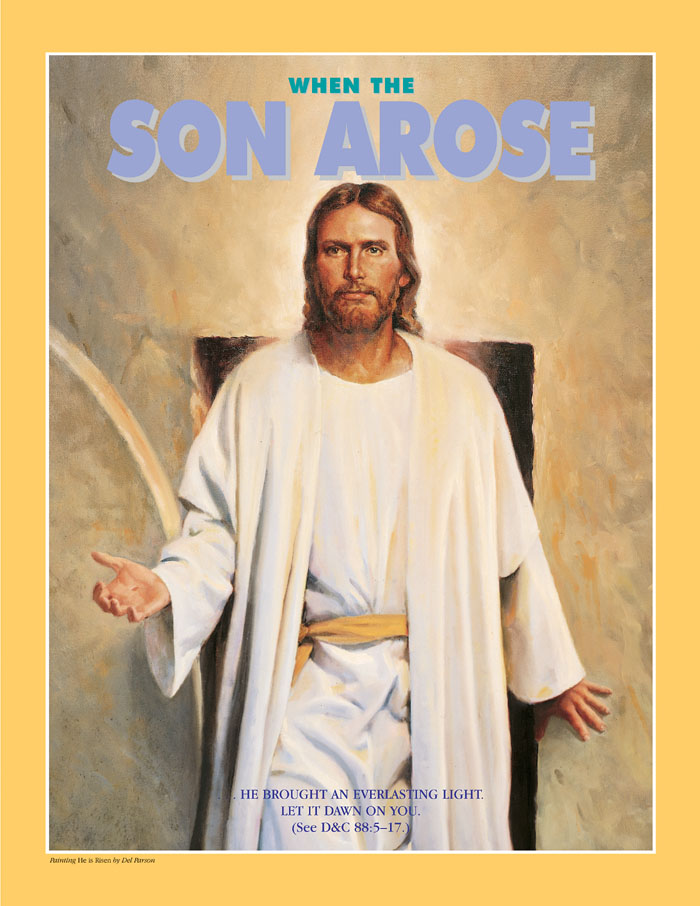
Today the font I am sharing with you is the font I used in the When the Son Arose... Easter poster from Monday.

The font is Janda Elegant Handwriting by Kimberly Geswein of Kimberly Geswein Fonts.


If you like this font take a look at her website. She has a ton of fonts all of them are just as pretty as this one.

Janda Elegant Handwriting font is free for personal use but Kimberly asks that you donate $5 for commercial use. You can download it from DaFont or from Fontspace.

Creative Commons License

April 14, 2014

Doctrine and Covenants Easter Poster
When the Son Arose {Free Printable}

Hi there everyone. I know is been about a years since we've posted anything. It's been a crazy busy year for the two of us. Thank you everyone for continuing to follow us and support us.

Easter is coming up and I felt inspired by pinterest and all the "He is risen" Easter posters that have been pinned and while I was pursuing the inter webs for an inspiring easter quote I found this New Era Poster from April 2002.


I don't know why but the poster made me feel something and after reading the scripture it struck me so much so that I felt like I wanted (after a year of being absent) to make a poster to share with all of you. 

I think the reason I felt so inspired by the New Era poster is because I just LOVE spring and Easter and the light and renewal the both bring to the world. I could go on but I don't want to bore you. I just wanted you to know it makes me happy. 


*Remember - Loving Life Designs downloads are for followers only. We ask that if you download our creations you become a follower. It only takes a second. Thanks. 

 I have three colors for you to choose from and all are 8x10 images.

Creative Commons License

July 24, 2013

How to Download and Install
Loving Lifes Blogger Templates
{Blogger Tutorial}

I've had several questions, lately, on how to download and install Loving Life Designs Blogger Templates. I hope this clears up any confusion there might be on how to do this.

First you'll need to decide on which template you would like to use on your blog. For this tutorial I have chosen to download and install my Simple Two Tone Template Sunshine and Clouds. Click on the download here button or text that has been provided as a link.

After you have clicked on the link you SHOULD be linked to this or a similar box.com webpage. If you are not sent to this page please let me know, and let me know which template is not working. If you are seeing this page then you are in the correct place. 


Next, in the top left there is a download button - Click it. 
    

It should then download the XML file. Take note as to where it was downloaded on your machine. 

Now you'll want to open your blogs dashboard and click on Template. 

On the top left of the browser window is a back up and restore button - Click it. 


A window looking like the one below should pop up. 


If you have made changes to your blog and would like to keep those for any reason or to make a backup of how your blog looks now, incase there is a problem with the upload, click on download full template and save it. 

If you don't care click choose file below the phrase "upload a template from a file on your hard drive". Find the new template file on your hard drive and click choose or okay. 

The pop up window will then look like this. 
With a little spinny wheel telling you it's uploading. 

Once the template has uploaded the window should close automatically. You can see that the new template has taken affect when you see the new template in the live on blog screen. 


To see the blog full screen click on view blog.


Viola you are done. 


Clear as mud? 

Creative Commons License